
Summary
Let Cursor answer business questions from SAP S/4HANA on-premise or Private Cloud, straight from HANA, with SAP's own data dictionary as tools. Read-only, self-hosted, no BTP.
Try asking
Example prompts for SAP S/4HANA (HANA SQL)
Click any prompt to copy it. Paste into Claude, ChatGPT, Cursor, Gemini, Copilot or OpenClaw to run it against this connector.
Claude is AI and can make mistakes. Please double-check responses.
TL;DR: The SAP S/4HANA (HANA SQL) connector lets Cursor read an S/4HANA system directly from its HANA database. Before it writes a query, Cursor looks up what BUKRS, HSL or VBRK mean in SAP's own data dictionary, so it picks the right table, the right currency field and the right client. The session is read-only in HANA itself, results are capped at 1,000 rows and every statement times out. You need a HANA database user from SAP Basis and a self-hosted AnythingMCP that can reach the HANA SQL port.
| Facts | |
|---|---|
| Connector | SAP S/4HANA (HANA SQL), 10 tools |
| Systems | S/4HANA on-premise, Private Cloud (RISE), HANA Enterprise Cloud |
| Access | Read-only: a single SELECT per call, SET TRANSACTION READ ONLY, 1,000-row cap, 60 s timeout |
| Driver | hdb bundled; SAP's @sap/hana-client optional, installed by you |
| Hosting | Self-hosted inside the network that reaches HANA (AnythingMCP is open source, AGPL-3.0) |
| Tested | Every tool run against a live SAP S/4HANA 2025 system |
- 10 sap_* tools
- Roles and tool access
- Read-only by default
- Audit log
Why a plain SQL connector is not enough for SAP
SAP's tables and fields are short German abbreviations: ACDOCA is the Universal Journal, RBUKRS the company code, HSL the amount in company code currency, VBRK the billing document header. A model that only sees column names guesses, and SAP punishes guesses: amounts belong to a currency field on another column, every table is split by client (MANDT), dates are YYYYMMDD strings and document numbers carry leading zeros.
The connector gives Cursor SAP's own dictionary as tools. It reads the tables SAP uses to describe itself (DD02L, DD03L, DD04T, DD07T, DD08L and the CDS annotations), so Cursor sees the business label of every field, which currency or unit field goes with each amount, what the codes of a field mean, how tables join, and which of SAP's CDS views are released and analytical. Only then does it write the query.
How Cursor finds the data
sap_guideexplains SAP's data model for SQL: the client, dates asYYYYMMDD, currencies, the Universal Journal. It costs nothing and touches no data.sap_org_structurelists the company codes with their currency and fiscal year variant, plants and sales organizations. Almost every question is scoped by one of them.sap_search_cds_viewsandsap_search_tablesfind where the data lives, preferring SAP's released analytical CDS views, where joins, currencies and signs are already handled.sap_describe_tablegives every field its business label, the currency or unit field of each amount and the check table of each code.sap_queryruns one read-onlySELECT, filtered by client, organization and period, aggregated in SQL.
What you can ask
Three questions end to end. The SQL comes from the recipes in sap_guide; replace client 100, company code 1010 and the dates with your own. Cursor states the assumptions it made, such as which accounts count as revenue, and asks you to confirm them.
“What was our revenue per posting period in 2025?”
HANA SQLsap_guidesap_org_structuresap_queryACDOCAUniversal Journal, leading ledger 0L
SELECT POPER, RHCUR AS CURRENCY, -SUM(HSL) AS REVENUE
FROM ACDOCA
WHERE RCLNT = '100' AND RLDNR = '0L' AND RBUKRS = '1010' AND GJAHR = '2025'
  AND RACCT BETWEEN '0040000000' AND '0049999999'  -- revenue accounts: confirm the range
GROUP BY POPER, RHCUR ORDER BY POPER;
One row per posting period, in company code currency. Revenue is posted as a credit, so the sum is negated.
“Which customers have invoices more than 60 days overdue, and how much?”
HANA SQLsap_guidesap_org_structuresap_queryACDOCAUniversal Journal, customer lines (KOART = D)
SELECT KUNNR, RHCUR AS CURRENCY,
       SUM(HSL) AS OPEN_AMOUNT,
       SUM(CASE WHEN NETDT >= '20251231' THEN HSL ELSE 0 END) AS NOT_DUE,
       SUM(CASE WHEN NETDT < '20251231' AND NETDT >= '20251101' THEN HSL ELSE 0 END) AS OVERDUE_1_60,
       SUM(CASE WHEN NETDT < '20251101' THEN HSL ELSE 0 END) AS OVERDUE_OVER_60
FROM ACDOCA
WHERE RCLNT = '100' AND RLDNR = '0L' AND RBUKRS = '1010' AND KOART = 'D' AND POPER <> '000'
  AND BUDAT <= '20251231' AND (AUGDT = '00000000' OR AUGDT > '20251231')
GROUP BY KUNNR, RHCUR ORDER BY OVERDUE_OVER_60 DESC LIMIT 20;
Open items at the key date, aged by net due date. Items cleared after the key date still count as open on it.
“Who were our top 10 customers by net sales in 2025?”
HANA SQLsap_guidesap_field_valuessap_queryVBRKBilling document headerVBRPBilling document itemsKNA1Customer master
SELECT k.KUNAG, c.NAME1, k.WAERK, SUM(p.NETWR) AS NET_SALES
FROM VBRK k JOIN VBRP p ON p.MANDT = k.MANDT AND p.VBELN = k.VBELN
LEFT JOIN KNA1 c ON c.MANDT = k.MANDT AND c.KUNNR = k.KUNAG
WHERE k.MANDT = '100' AND k.FKDAT BETWEEN '20250101' AND '20251231'
  AND k.FKSTO = '' AND k.VBTYP = 'M'
GROUP BY k.KUNAG, c.NAME1, k.WAERK ORDER BY NET_SALES DESC LIMIT 10;
Ten rows with customer number, name, currency and net sales. Customers are ranked from billing documents, not from the journal: in ACDOCA the customer sits on the receivable line, not on the revenue line. Cursor reads the values of VBTYP first to tell invoices from credit memos and cancellations.
HANA SQL or OData?
AnythingMCP connects to S/4HANA on-premise and Private Cloud in two ways. Pick one, or run both side by side.
| HANA SQL (this guide) | OData | |
|---|---|---|
| Reads | Any table or CDS view the database user may read | The OData services the SAP user may call |
| SAP authorizations | Not applied: the database grants are the boundary | Checked by SAP on every call |
| Good at | Totals over millions of rows, finance and cross-module analysis | Published APIs, business-object views, SAP's own checks |
| You need | A HANA database user, network access to the SQL port, a licence that allows it | A technical SAP user, active Gateway services |
What you need
- An SAP Basis admin who can create a user in the tenant database that holds the ABAP schema (usually
SAPHANADBorSAPABAP1). - The connection details: host, the tenant's SQL port (
3<instance>15for the first tenant,3<instance>41and up for further tenants), tenant name, schema, the three-digit SAP client and the SAP language for texts (EEnglish,DGerman). - A self-hosted AnythingMCP that can reach that port. HANA's SQL port is normally reachable only inside the company network or the SAP private cloud landing zone.
- A licence check. Direct SQL access to the ABAP schema by a third-party application is governed by your SAP HANA licence. A runtime licence bundled with S/4HANA usually does not cover it; a full-use licence does. Ask your SAP account team before you connect a production system. In SAP's private cloud offerings, the database user and the network path are requested from SAP.
Setup
Step 1: Create a read-only database user
In the tenant that holds the ABAP schema:
CREATE USER AMCP_READER PASSWORD "<strong password>" NO FORCE_FIRST_PASSWORD_CHANGE;
ALTER USER AMCP_READER DISABLE PASSWORD LIFETIME;

-- dictionary tools
GRANT SELECT ON SAPHANADB.DD02L TO AMCP_READER;
GRANT SELECT ON SAPHANADB.DD02T TO AMCP_READER;
GRANT SELECT ON SAPHANADB.DD03L TO AMCP_READER;
GRANT SELECT ON SAPHANADB.DD03T TO AMCP_READER;
GRANT SELECT ON SAPHANADB.DD03ND TO AMCP_READER;
GRANT SELECT ON SAPHANADB.DD04T TO AMCP_READER;
GRANT SELECT ON SAPHANADB.DD07T TO AMCP_READER;
GRANT SELECT ON SAPHANADB.DD08L TO AMCP_READER;
GRANT SELECT ON SAPHANADB.DD05S TO AMCP_READER;
GRANT SELECT ON SAPHANADB.DDHEADANNO TO AMCP_READER;
GRANT SELECT ON SAPHANADB.DDFIELDANNO TO AMCP_READER;
GRANT SELECT ON SAPHANADB.ARS_W_API_STATE TO AMCP_READER;
-- organization structure
GRANT SELECT ON SAPHANADB.T001 TO AMCP_READER;
GRANT SELECT ON SAPHANADB.T001K TO AMCP_READER;
GRANT SELECT ON SAPHANADB.T001W TO AMCP_READER;
GRANT SELECT ON SAPHANADB.TKA01 TO AMCP_READER;
GRANT SELECT ON SAPHANADB.TVKO TO AMCP_READER;
GRANT SELECT ON SAPHANADB.TVKOT TO AMCP_READER;
GRANT SELECT ON SAPHANADB.T024E TO AMCP_READER;
-- then the business tables and CDS views your use cases need, e.g.
GRANT SELECT ON SAPHANADB.ACDOCA TO AMCP_READER;
GRANT SELECT ON SCHEMA SAPHANADB is simpler for broad analytics, but then everything in the schema is readable, HR data included. SQL does not apply SAP's application authorizations (company code, sales organization, HR checks): whatever the database user can read, Cursor can read.
Optionally, cap the user's statements on the server side too:
CREATE WORKLOAD CLASS "AMCP_READER_WC" SET 'STATEMENT TIMEOUT' = '60', 'STATEMENT MEMORY LIMIT' = '20';
CREATE WORKLOAD MAPPING "AMCP_READER_WM" WORKLOAD CLASS "AMCP_READER_WC" SET 'USER NAME' = 'AMCP_READER';
Step 2: Run AnythingMCP inside the network
On a host that reaches the HANA SQL port:
mkdir anythingmcp && cd anythingmcp
curl -fsSLo docker-compose.yml \
  https://raw.githubusercontent.com/HelpCode-ai/anythingmcp/main/docker-compose.quickstart.yml
printf 'JWT_SECRET=%s\nENCRYPTION_KEY=%s\n' "$(openssl rand -hex 32)" "$(openssl rand -hex 32)" > .env
docker compose up -d   # → http://localhost:3000
Add the HANA host to SSRF_ALLOWED_HOSTS in .env: AnythingMCP refuses private addresses by default.
Step 3: Install the connector
Open Connectors → Marketplace, search for S/4HANA and install SAP S/4HANA (HANA SQL):
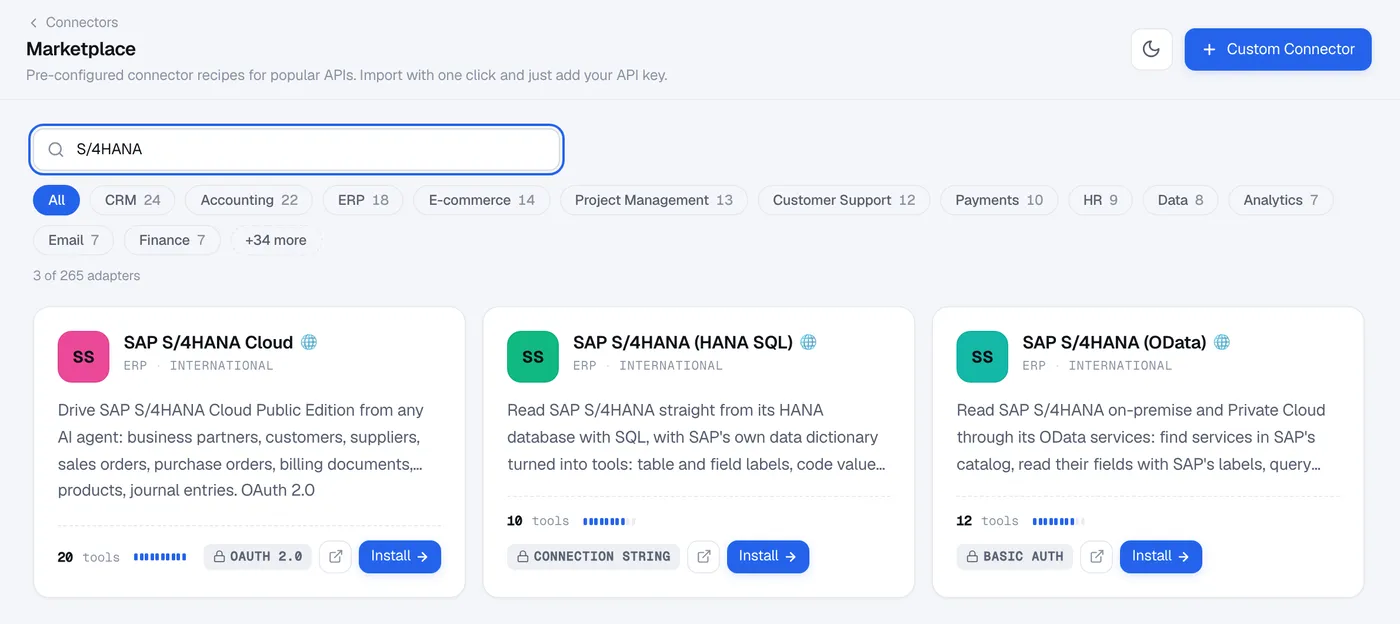
Then fill in the variables. The ones that form the connection address are required before the connector can be created:
| Variable | Example |
|---|---|
SAP_HANA_HOST | hana.internal |
SAP_HANA_PORT | 30015 |
SAP_HANA_TENANT | S4P |
SAP_HANA_SCHEMA | SAPHANADB |
SAP_CLIENT | 100 |
SAP_LANGUAGE | E |
SAP_HANA_TLS | verify, no-verify for a self-signed certificate, or off |
SAP_HANA_USER / SAP_HANA_PASSWORD | AMCP_READER and its password |
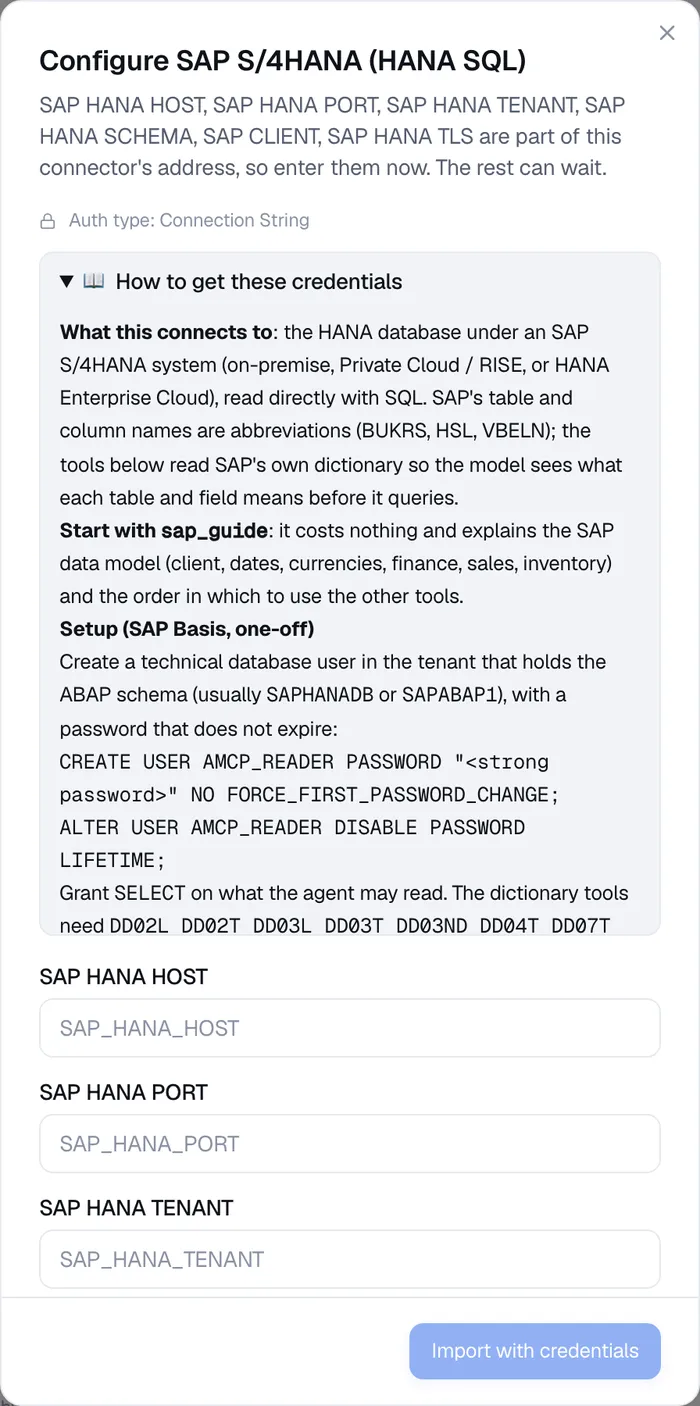
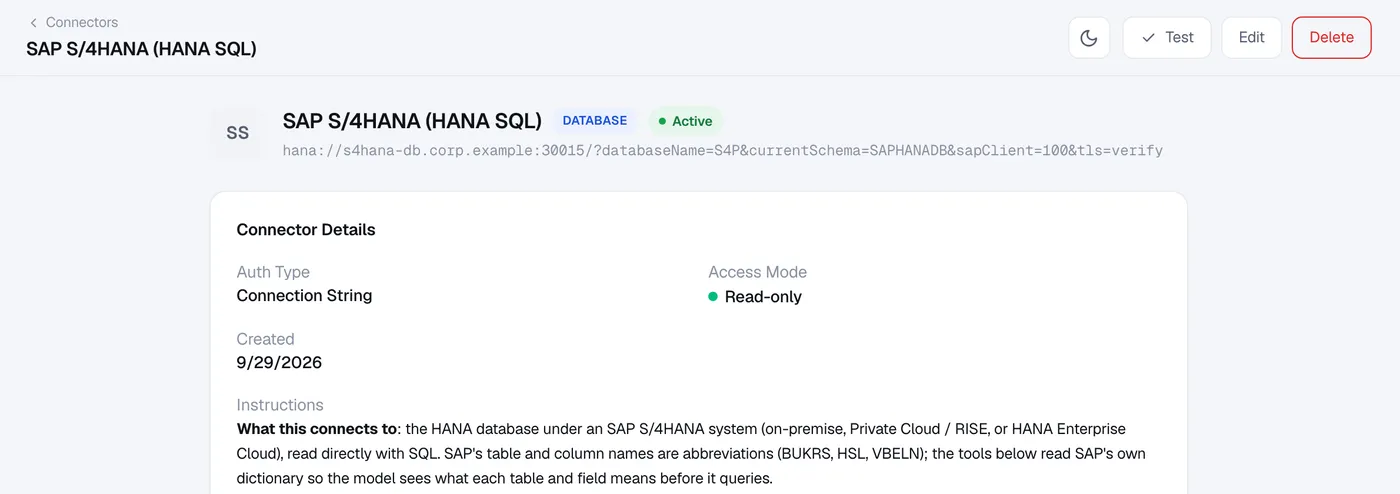
The install makes one test call (sap_org_structure) and tells you whether the credentials and grants work. The password is stored encrypted and never shown to Cursor.
Step 4: Add the MCP server to Cursor
Cursor runs on your computer, so it can use a local AnythingMCP instance as well as a public one. Add the server to ~/.cursor/mcp.json (all projects) or .cursor/mcp.json (one project), with the URL of your MCP server (shown under MCP Servers in AnythingMCP) and a key from its API keys:
{
  "mcpServers": {
    "sap-hana": {
      "url": "<your MCP server URL>",
      "headers": { "X-API-Key": "<key>" }
    }
  }
}
Then check in Cursor's MCP settings that the server is enabled and its tools are listed.
Step 5: Ask
Start with something that scopes the data, for example "Which company codes are in this system, and in which currency?". The connector tells Cursor to read sap_guide first; from there it works through the dictionary tools on its own.
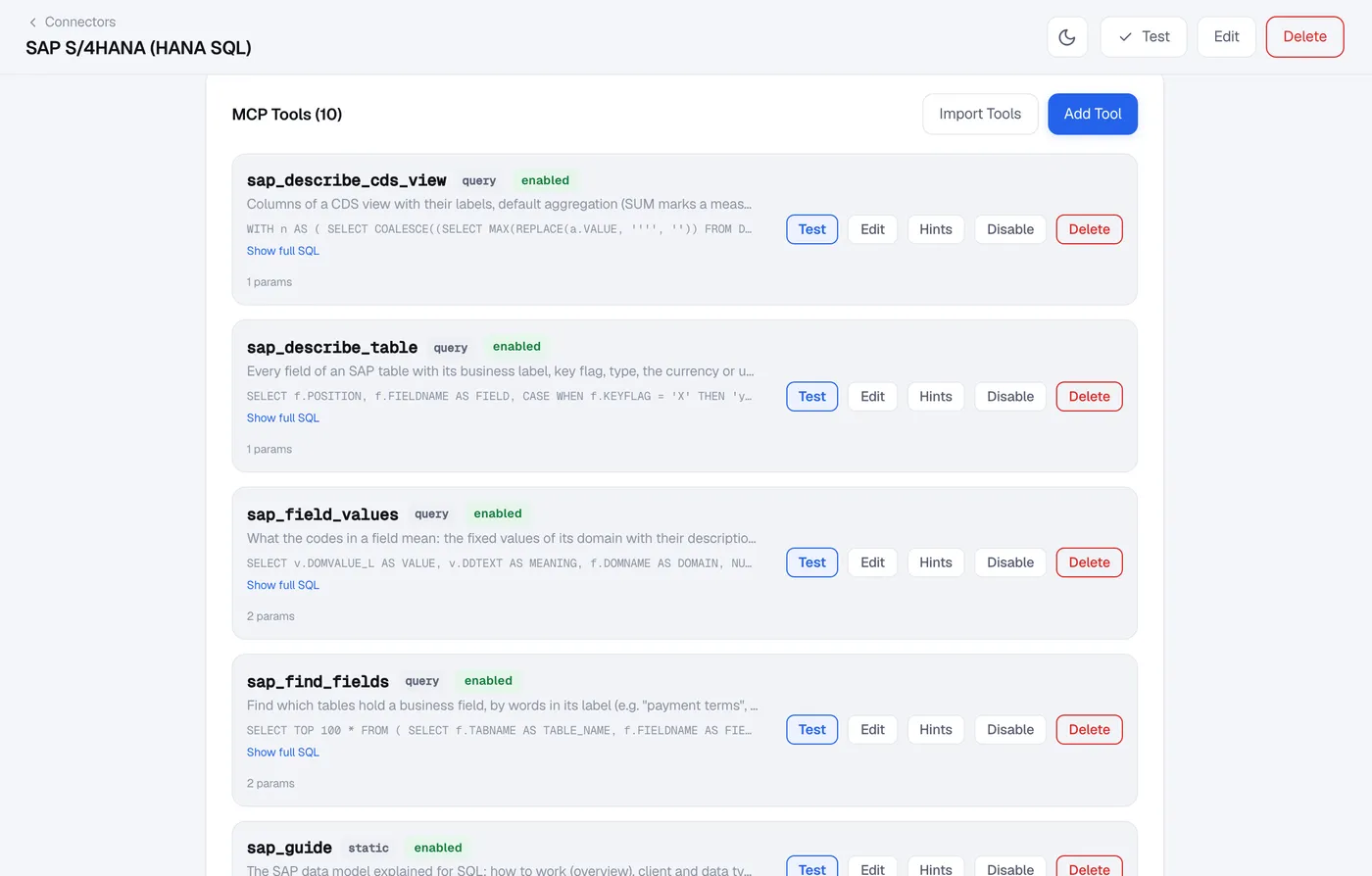
Available tools
| Tool | What it gives Cursor |
|---|---|
sap_guide | The SAP data model explained for SQL, by topic: basics (client, dates, leading zeros, currencies), finance (the Universal Journal ACDOCA), sales, inventory, procurement, operations, pitfalls and query recipes. Costs nothing and touches no data. |
sap_org_structure | Company codes with currency, chart of accounts and fiscal year variant; controlling areas, plants, sales and purchasing organizations. |
sap_search_tables | Tables by name or description with their row count, flagging S/4HANA compatibility views that plain SQL would read wrongly. |
sap_describe_table | Every field with its label, key flag, type, the currency or unit field of each amount, and the check table. |
sap_find_fields | Which tables hold a business field, e.g. "net due date". |
sap_field_values | What the codes of a field mean, e.g. the billing document categories. |
sap_table_relations | Foreign keys with their join conditions, and the text table. |
sap_search_cds_views | SAP's CDS views by name or label, marking released and analytical ones. |
sap_describe_cds_view | Columns of a CDS view with labels, measures, currency and unit fields, and associations. |
sap_query | One read-only SELECT, capped at 1,000 rows and timed out. |
What the connector enforces
Using SAP's native driver
AnythingMCP ships with hdb, SAP's pure-JavaScript HANA driver (Apache-2.0). It covers user and password, TLS, multi-tenant systems and everything the connector does. SAP's native driver, @sap/hana-client, adds Kerberos, the secure user store (hdbuserstore) and connection pooling. It is published under the SAP Developer License, which does not allow us to redistribute it, so it is never part of the image: you install it into your own deployment, either by extending the image or by mounting it as a volume, and select it with driver=hana-client on the connection string or HANA_DRIVER=hana-client for every HANA connector. Check that your SAP agreement covers its use in production. On arm64 hosts, keep the bundled hdb driver or build your own Debian-based image. Step by step: SAP HANA in the AnythingMCP docs.
Example prompts
- "Show me revenue per posting period for company code 1010 in 2025."
- "Which customers have open receivables older than 30 days, and how much per customer?"
- "Top 10 customers by net sales this year, from the billing documents."
- "Which released analytical CDS views cover journal entries? Describe the measures of the first one."
- "What do the values of the billing document category field mean?"
- "Goods movements per movement type in plant 1010 last month."
Troubleshooting
- A CDS view returns no rows.
SAP_CLIENTis missing or wrong; the connector needs it to setCDS_CLIENT. - Connection refused or a redirect to an unknown host. Use the tenant's own SQL port rather than the system database port, which may redirect to an internal host name the connector cannot resolve.
- "Insufficient privilege". The table is not granted to the database user. Grant it, or ask Cursor to use a table or CDS view it can read.
- Certificate error. Use
SAP_HANA_TLS=no-verifyfor a self-signed certificate, or install the CA. - A query times out. Ask Cursor to filter by company code, period or plant and aggregate in SQL; raise
statementTimeoutonly if the query is genuinely large.
FAQ
Can Cursor change data in SAP through this connector?
No. The HANA session is read-only, only a single SELECT runs, and writes and locking reads are refused. Create the database user with SELECT grants only, so HANA enforces the same rule.
Does it respect SAP authorizations? No. SQL bypasses SAP's application authorizations, so the database grants decide what Cursor can read. If you need SAP's authorization checks, use the OData route instead, or grant only the tables and views that are fine to read.
Is direct SQL access to S/4HANA allowed by my SAP licence? It depends on your HANA licence. A runtime licence bundled with S/4HANA usually does not cover third-party SQL access to the ABAP schema; a full-use licence does. Check your contract before connecting production.
Does it work with S/4HANA Private Cloud (RISE)? Yes, if SAP provides a database user and a network path to the HANA SQL port, and AnythingMCP runs where it can reach that port. Request both from SAP.
Can I use AnythingMCP Cloud instead of self-hosting? Only if the HANA SQL port is reachable from the internet, which is rarely the case and rarely advisable. Self-host AnythingMCP next to SAP.
Does it work with ChatGPT and Copilot too? Yes. The same MCP server works in ChatGPT (developer mode, paid plans), GitHub Copilot, Claude and Claude Code, with the same tools and the same read-only limits.
Do I need SAP BTP or SAP Joule for this? No. The connector talks to the HANA database directly, so it needs neither BTP nor Joule nor SAP Gateway. It also runs next to Joule if you use both.
Is this an SAP HANA MCP server I can run myself? Yes. AnythingMCP is open source (AGPL-3.0) and runs with Docker Compose next to SAP. The sap-hana-mcp-server repository packages this connector on its own, and SAP HANA MCP server explains it for developers.
Does Cursor support custom MCP servers on the free tier? Yes — MCP is available on Hobby, Pro and Business plans.
Next steps
- SAP HANA MCP server: the same connector from a developer's point of view
- OData to MCP: the other route to S/4HANA on-premise, with SAP's authorization checks
- Connect SAP to Cursor: every SAP connector at a glance
- Database to MCP: SAP HANA as a plain database connector, next to SQL Server, PostgreSQL and Oracle
- SAP HANA on GitHub: connection string options and the native driver
- Connect to Claude
- Connect to Meta Muse
- Connect to Gemini
Was this guide helpful?
