
Summary
Saved e-mails on a file server or NAS, searchable from Claude and ChatGPT: sender, date, subject, body and the text of PDF, Excel and Word attachments. Which formats AnythingMCP File Search reads (.msg, .eml), which it does not (.pst, .mbox), and how to set it up.
Try asking
Example prompts for Network folder (File Search)
Click any prompt to copy it. Paste into Claude, ChatGPT, Cursor, Gemini, Copilot or OpenClaw to run it against this connector.
Claude is AI and can make mistakes. Please double-check responses.
TL;DR: Many teams file important e-mails as .msg or .eml files in project or customer folders: the order confirmation, the complaint, the agreement on a delivery date. AnythingMCP File Search indexes those files with sender, recipients, date, subject, body and the text of their attachments, so Claude or ChatGPT can answer "what did we agree with the supplier about the delay in March?" with the e-mail, its date and the attachment that matters. Outlook data files (.pst, .ost) and mailbox files (.mbox) are not read; for a live mailbox use a mail connector instead.
Two kinds of e-mail, two connectors
| You want to search | Use |
|---|---|
| E-mails saved as files in folders (project files, customer files, "Correspondence") | File Search on the share or NAS (this guide) |
| A live mailbox: today's inbox, sent items, threads | A mail connector: Email (IMAP/SMTP), Gmail or Outlook (Microsoft 365) |
File Search is the right tool when the e-mail is part of a record: it sits in the folder of the order, the project or the supplier, next to the offers and drawings it belongs to, and it should be found together with them.
What gets indexed from an e-mail
For every .msg (Outlook) and .eml (standard MIME) file, the index holds:
From: [email protected]
To: [email protected]
Date: 2025-10-06 10:00
Subject: Preiserhöhung 2026
Attachments: <file names, if any>

<body of the e-mail>

--- Attachment: <file name> ---
<text of each attachment File Search can read>
- The body: plain text, or the HTML version converted to text.
- Attachments, one level deep: PDF, Excel, Word, PowerPoint and the other supported formats are read with the message, so a price in an attached order confirmation or price list is found by the same search. All attachment text of one message is capped at 200,000 characters.
- Not read: e-mails attached to e-mails (forwarded as attachment), attachment types File Search does not read (images, ZIP, CAD), and the content of encrypted messages. Signed messages are read as far as possible.
- Every file is also findable by name, folder and date.
The header is from the fictional demo share used in the screenshots below.
Formats
| Format | Read? |
|---|---|
.msg (Outlook, saved by drag and drop or "Save as") | Yes, with attachments |
.eml (Thunderbird, Apple Mail, most mail clients and archiving exports) | Yes, with attachments |
.pst, .ost (Outlook data files) | No, found by name only |
.mbox (one file holding many messages) | No, found by name only |
If your archive is a .pst, save the messages that belong to a record as .msg into the folder of that record, which is what most teams that file e-mails already do.
Set it up
- Connect the folder that holds the saved e-mails as a File Search connector: self-hosted as a Network folder (how), on the Cloud over SFTP, FTPS or WebDAV (NAS step by step).
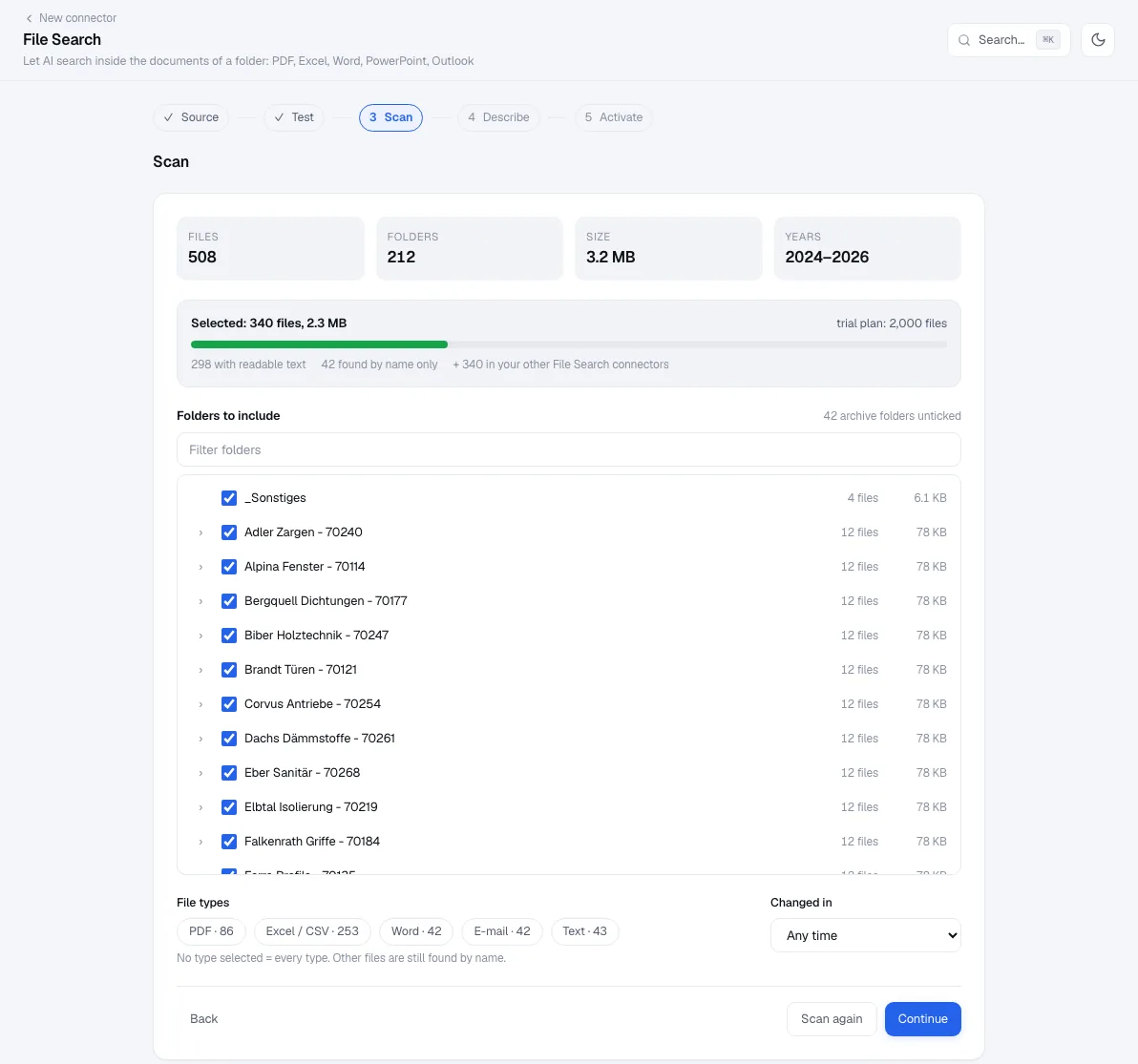
- Scan. The type chips show how many e-mails the folder holds (E-mail), next to PDF, Excel, Word and text. Select only the e-mails if you want a pure correspondence index, or keep everything so the e-mails are found together with their project files.
- Describe. Tell the AI how the archive is organised: "One folder per customer number; e-mails are in the subfolder
Correspondence; file names start with the dateYYYY-MM-DD." - Activate and give the connector only to the roles that should read this correspondence.
Ask
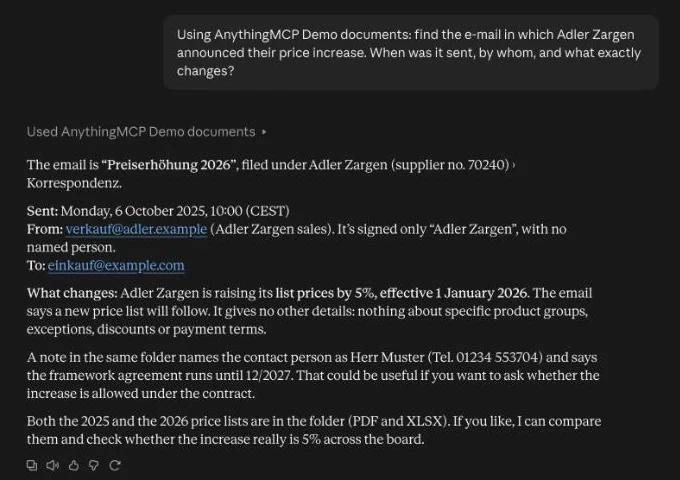
- "Find the e-mail in which Adler Zargen announced their price increase. When was it sent, by whom, and what exactly changes?"
- "Which e-mails in the Korrespondenz folders announce a price increase for 2026? List supplier, date and percentage."
- "Find the signed offer for the Lindenhof project; it was sent as an attachment in April."
- "What did the customer complain about in the last three e-mails in the folder of customer 10234?"
The assistant uses _grep for exact terms (order numbers, e-mail addresses, a name in the From: line), _search for topics ("delivery delay", "complaint"), filters by folder and date, and _read to open the e-mail before it answers. It names the file and the date of the message.
Personal data and permissions
E-mails contain personal data, more than most files on a share. A few rules keep the setup proportionate:
- Index the records, not everyone's mailbox. Point the connector at the folders where e-mails are filed on purpose, not at exported personal mailboxes.
- Limit who gets the tools. Assign the connector only to the roles that work with this correspondence. On Enterprise, folder permissions per role restrict a role to some folders inside one connector.
- Self-host if the archive must stay in your network. The index then lives on your server, and only what a tool returns for a question reaches the AI provider.
- Everything is logged. Every search, read and file link is in the audit log with the user.
Plans
File Search is included in every AnythingMCP Cloud plan within its limits: 500 files on the trial and Starter, 2,000 on Team, up to 50,000 on Enterprise. An e-mail counts as one file, whatever the number of attachments. Self-hosted needs a paid licence or the 30-day trial. Compare plans.
FAQ
Are the attachments searchable on their own? Their text is indexed with the message, so a search for a number in an attached PDF returns the e-mail. To work with the attachment itself, save it next to the e-mail, or ask the assistant for the e-mail file.
What about e-mails in German, Italian or other languages? Exact searches match in any language. The wizard detects the main language of the folder and tells the AI to search in it.
Can the AI send or answer e-mails from this archive? No. File Search only reads. Sending is the job of a mail connector, with its own permissions.
Related
- Search a Synology or QNAP NAS with Claude and ChatGPT, step by step
- Find an article number in PDF and Excel price lists
- Find technical drawings by part number with AI
- Folder permissions per role for AI file search
- Search your company file server with AI
- Share files from an AI chat as download links
- Network folder (self-hosted) in Claude, ChatGPT, Microsoft Copilot, Gemini
Was this guide helpful?