Summary
When an agent keeps solving the same multi-step task, it can propose a reusable code tool with code_propose_tool. The proposal runs nothing and grants nothing; an administrator reviews the program under AI Skills and creates the tool with one click, read-only and with the caller's permissions. How it works in AnythingMCP, step by step.
TL;DR: An agent that answers "monthly revenue by channel" by writing the same program every week should not have to rewrite it each time, and should not be able to create tools on its own either. In AnythingMCP code mode it does the in-between: it calls code_propose_tool with a name, a description, the program and the reason it is worth keeping. That records a proposal and nothing else: no code runs, no tool appears. An administrator finds it under AI Skills → Suggested, reads the program, and clicks Create tool. The new tool is read-only and runs with each caller's own permissions; anything more is a separate, deliberate edit. Available in self-hosted AnythingMCP from v0.52.0, coming soon to AnythingMCP Cloud.
Why proposals, not self-made tools
Agents are good at spotting that a task is mechanical: the same three calls, the same join, the same sum. Turning that into a saved tool makes the next answer faster, cheaper and more consistent. But a tool is also a permanent capability in your workspace, and the program behind it was written by a model that may have read untrusted content. So the agent gets to suggest, and a person decides. It is the same principle AnythingMCP uses for skills and company memory that AI clients propose: the agent drafts, an administrator approves.
What you need
- Self-hosted AnythingMCP v0.52.1 or later with the code runner configured (setup in step 1 here).
- Code mode set to
inlineon the MCP server.inlineis what offerscode_executeandcode_propose_tool;toolsonly serves saved code tools. Set it on the server's settings page (Code mode → Saved code tools + inline code), available since v0.52.1; see step 2 of the code tool tutorial. - The inline-code capability on the user's role. Workspace administrators have it.
- As announced with v0.52, inline code and proposals are part of Team and Enterprise.
Step 1 — The agent solves the task inline
A user asks a question that takes several calls, for example "revenue in October, shop and B2B invoices". With inline code on, the agent writes a program and runs it with code_execute: read-only, with the user's own permissions, over the connectors the user can reach on that server. See the revenue recipe for what such a program looks like.
Step 2 — The agent proposes to keep it
When the agent finds the pattern worth keeping (on its own, or because the user says "save this as a tool"), it calls code_propose_tool with:
| Field | What the agent fills in |
|---|---|
name | A short tool name, e.g. monthly_revenue_by_channel |
description | What the tool does and returns, for the administrator and for future callers |
code | The program, the same kind of body as for code_execute |
rationale | Why it is worth saving, e.g. "asked four times this month; replaces about 20 tool calls" |
inputSchema | Optional: the tool's own parameters, e.g. month as YYYY-MM |
The answer to the agent is plain: the proposal is recorded for review and will not run or become a tool until an administrator approves it. The user can be told the same.
Step 3 — The administrator reviews it
Open AI Skills in the sidebar (under Intelligence) and switch to Suggested. A proposal appears as a card marked Code tool proposal, with:
- the scope and a note that it was proposed by an agent and is read-only, runs with the caller's permissions;
- Why: the agent's rationale;
- Does: the description;
- Program with its length in characters, to read in full;
- a note on which connector the tool will be created and that writes or author's rights can only be added later on the connector's tools page.
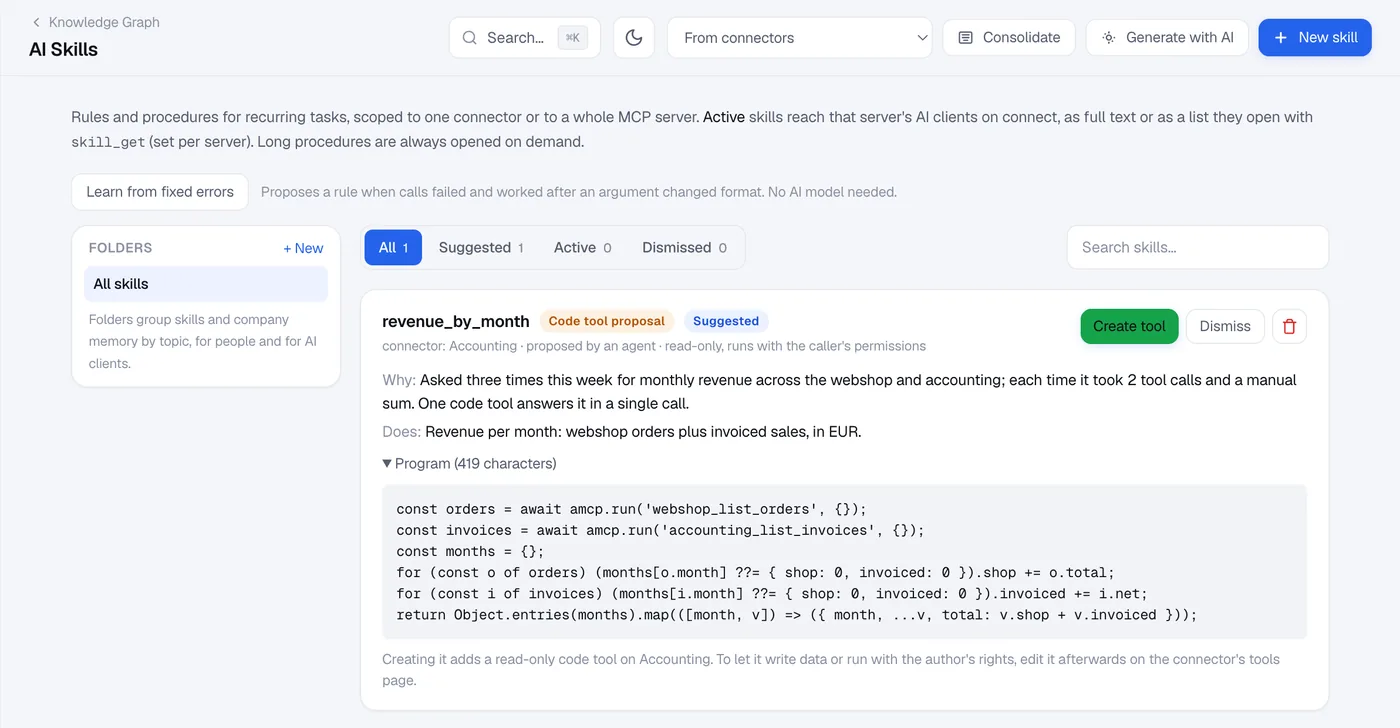
Read the program the way you would review a small pull request:
- Which tools does it call? Every
amcp.run('…'). Are they the ones the description promises, and all reads? - What does it return? Only what the question needs, or whole records with personal data?
- Does it loop sensibly? Paging that ends, batches of parallel calls, no call per row of a large table without need. A run stops after 10 seconds and 500 tool calls.
- Is the name and description clear enough that the AI will call it at the right moment and explain its result correctly (gross or net, which period, which systems)?
Step 4 — Create the tool, or dismiss it
Create tool runs the normal tool-creation checks: the connectors must belong to the same workspace, and the plan's number of saved code tools applies. The tool is created on the connector named in the card:
- read-only (it may call only tools that do not change data);
- run as invoker (every inner call is checked against the caller's own role);
- using the proposer's connectors on that server. Open the tool afterwards and narrow Uses to the connectors and tools it really calls.
Dismiss moves the proposal to the Dismissed tab. If the agent keeps proposing something you do not want, say so in the server's instructions.
Step 5 — Only if needed: more rights, deliberately
A created tool can be edited like any code tool on the connector's MCP Tools page. Two settings are not reachable through a proposal at all:
- Allow write tools, so the program may call tools that change data. Requires Enterprise.
- Run as definer, so the program runs with the author's curation instead of the caller's permissions. Administrators only.
Both are re-checked when you save. That is the point of the design: an agent can never raise its own authority, because a proposal is always read-only, always invoker, and limited to connectors the proposing user could already reach.
Why this is safe
- A proposal is inert.
code_propose_tooldoes not execute code and does not create anything. - No escalation. The proposed tool can only reference the proposer's own connectors and starts read-only, as invoker.
- A person decides. Only an administrator can turn a proposal into a tool, through the same checks as a tool written by hand.
- Runs stay contained and audited. Once created, every run goes through the isolated code runner and is recorded with each inner tool call. See Secure code execution for AI agents.
FAQ
Can a regular user propose tools?
Any user whose role has the inline-code capability, on a server with code mode inline. Without the capability, the user sees neither code_execute nor code_propose_tool.
Does the agent see whether its proposal was accepted? The agent sees the new tool in the server's tool list once it is created, like any other tool, and can call it from then on.
Can I edit the program before creating the tool? Create it, then edit it on the connector's MCP Tools page like any code tool: program, description, parameters, Uses.
Related
- What is MCP code mode?
- Build your first code tool, step by step
- Code mode recipes: monthly revenue, invoice reconciliation, 100 price lookups
- Secure code execution for AI agents
- MCP governance, user roles and permissions
- Knowledge graph for MCP
Was this guide helpful?

